

Virgin TV Control for PC
A must-have app for all Virgin TV customersUpdated March 30, 2023
Virgin TV Control PC Details
| Category | Entertainment |
| Author | Virgin Media |
| Version | 4.9.304-1507528 |
| Installations | 2319992 |
| Size | 17.2 MB |
| What's New | We have updated the app to support Android 16 |
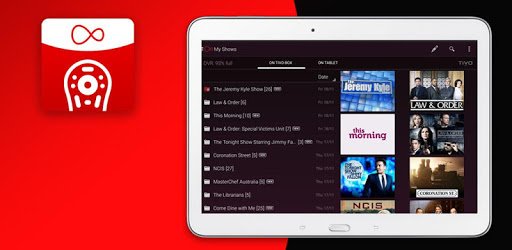
Virgin TV Control App Review
Introduction
The Virgin TV Control app is a useful tool for those who want to manage their TV viewing experience remotely. It allows users to record their favorite programs, watch TV using their phone as a remote control, and manage their recordings and series links from anywhere. However, the app has received mixed reviews from users, with some praising its functionality while others have experienced issues with connectivity and compatibility.
Features
- Record programs remotely
- Watch TV using phone as remote control
- Manage recordings and series links remotely
- Compatible with Android 5.0 and above
- Virgin Connect feature allows users to see who is connected to their router and manage their devices
- Media hotspots allow users to watch TV and recorded programs on the go
- New version of the app is faster and more responsive
User Reviews
Users have had mixed experiences with the Virgin TV Control app. Some have found it to be a useful tool for managing their TV viewing remotely, while others have experienced issues with connectivity and compatibility.
- "This is a good app if you can't get home for your programs you can set it anywhere to record it." - Positive review
- "Brilliant. My remote control stopped working. I ordered a free replacement via the Virgin Media app, downloaded this app and was able to watch the TV using my phone as remote control. No problems whatsoever." - Positive review
- "Awesome, stupid control wouldn't work as I got media wall, called virgin but couldn't get through to a human, found this, works a treat." - Positive review
- "App has been useless for months now. App used to work brilliantly. Now I have to wipe the data otherwise it sits trying to connect forever. Not worth the effort. Shame as remotely managing recordings was really useful." - Negative review
- "Limited function but kept me in business watching TV record and access my recorded shows on TiVo V6 box until new remote arrived. No pause, forward or back and had to use TV remote to turn TV on/off volume up/down. But glad to have it as a stop gap! Very helpful." - Mixed review
Conclusion
The Virgin TV Control app is a useful tool for managing TV viewing remotely. While some users have experienced issues with connectivity and compatibility, others have found it to be a reliable and convenient way to manage their TV viewing. The new version of the app is faster and more responsive, making it a worthwhile addition to any Virgin Media customer's toolkit.
How to Install Virgin TV Control on PC
Below instructions allows you to download and install Virgin TV Control app on Windows or MAC computer using an Android emulator. The process involves:
Download APK:Downloading the Virgin TV Control APK file by choosing a version.
Install Android Emulator:There are a number of Android emulators the internet. Choose a emulator that works better with your PC. Now, download and install the Android emulator software.
Run the Emulator:Open the emulator you have just installed and configure the settings such as display, keywords, mouse etc.
Install Gene:Open the downloaded Virgin TV Control APK file using the emulator, which will install Virgin TV Control on Windows or MAC.